
WeVideo Review: Browser-Based Video Editing Without Downloads
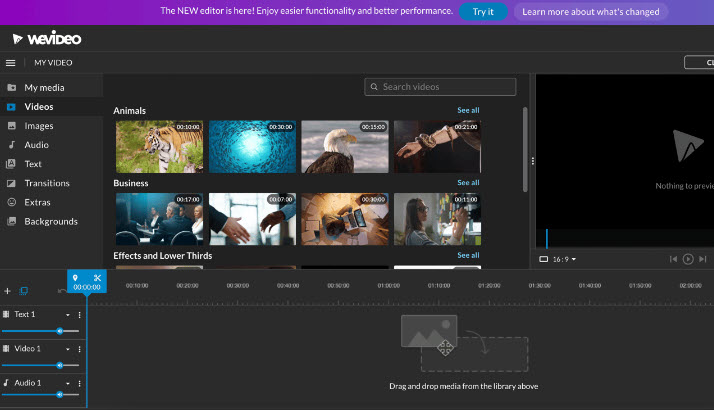
WeVideo is an online video editor that runs entirely in the browser, so there is nothing to install. It offers two editing modes (a simplified editor and a full-featured multi-track editor), thousands of templates, screen recording, and green-screen tools, which makes it popular with educators, marketers, and beginners.
What is WeVideo used for?
- Multi-track timeline editing with text, transitions, and effects.
- Screen and webcam recording for tutorials and training.
- Template-driven projects (intros, promos, social clips).
- Collaboration and publishing to social channels directly.
Key Features
- Simplified and full-featured editing modes for different skill levels.
- 1M+ stock assets and themed templates.
- Green screen (chroma key) and picture-in-picture.
- Up to 4K resolution and unlimited storage on paid plans.
Pros & Cons
Pros: no installation, cloud-based and collaborative, great templates, strong education plans. Cons: free plan adds a watermark, requires a subscription for 4K/watermark-free exports, heavier edits need a good connection.
Pricing
WeVideo has a free plan (with watermark). Paid plans include Creator and Professional, with annual and monthly options; dedicated Instructor/Organization plans cover education.
Verdict
A reliable cloud editor for quick, template-driven videos and classroom use, especially when you want to skip installs and collaborate in real time.
Unlock the Telegram group to access all tools on this site
A one-time payment of US$5 gives you access to the Telegram group and all tools on this site. No subscription.
Enable JavaScript to securely check payment and reveal the invite link.
Share this article