
Scrivener Review: Pro Writing Software for Long Documents
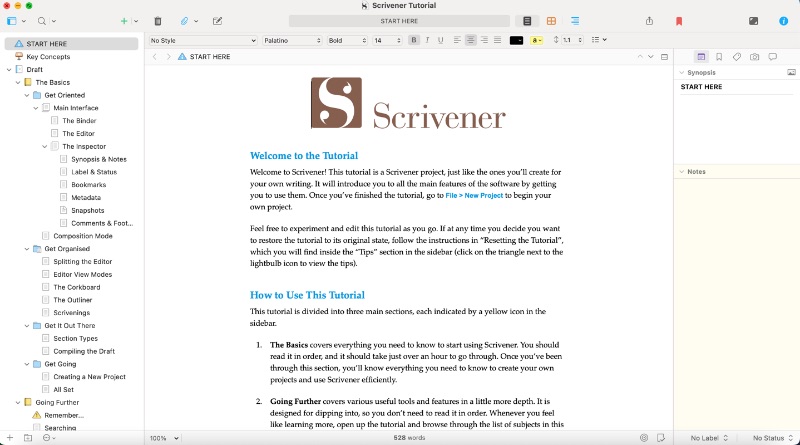
Scrivener is a writing application built for long, structured projects. Instead of one endless document, it keeps your manuscript in a binder of chapters and scenes, with an outliner, a virtual corkboard, and a research folder — then “compiles” everything into a finished manuscript, PDF, or ebook format.
What is Scrivener used for?
- Novels, non-fiction books, dissertations and theses.
- Screenwriting with a built-in screenplay mode.
- Organizing research, notes, and references alongside the draft.
- Exporting to Word, PDF, Final Draft, and ebook formats.
Key Features
- Binder + outliner + corkboard for visual project organization.
- Snapshots, versioning, and built-in backup.
- Distraction-free full-screen and composition modes.
- Targets, word-count tracking, and manuscript compile templates.
Pros & Cons
Pros: superb for long projects, powerful organization, one-time purchase (no subscription), exports to many formats. Cons: learning curve, no real-time cloud collaboration, desktop-first (separate iOS app).
Pricing
Scrivener is a one-time purchase: $59.99 for Windows or macOS, $50.99 for students/educators, $23.99 for iOS, or $95.98 for the Windows + Mac bundle. A 30-day free trial is available.
Verdict
If you write books, theses, or scripts, Scrivener’s organization features make it one of the best one-time-purchase writing tools you can buy.
Unlock the Telegram group to access all tools on this site
A one-time payment of US$5 gives you access to the Telegram group and all tools on this site. No subscription.
Enable JavaScript to securely check payment and reveal the invite link.
Share this article