• English
  • 中文 (中国)
  • ES Español
  • HI हिन्दी
  • AR العربية
  • BN বাংলা
  • PT Português
  • RU Русский
  • JA 日本語
  • DE Deutsch
  • FR Français
  • ID Bahasa Indonesia
  • TR Türkçe
  • TA தமிழ்
  • FA فارسی
  • IT Italiano
  • UR Urdu
  • MR Marathi
  • TE Telugu
  • VI Vietnamese
  • 한국어
  • ไทย
  • Tagalog
  • Kiswahili
  • ਪੰਜਾਬੀ
  • Basa Jawa
  • ગુજરાતી
  • Polski
  • Nederlands
  • Українська
  • Bahasa Melayu
  • Română
  • Magyar
  • Ελληνικά
  • Čeština
  • Svenska
  • සිංහල
  • ភាសាខ្មែរ
  • አማርኛ
  • Finnish
  • Icelandic
  • Slovak
  • Slovenian
  • Estonian
  • Latvian
  • Lithuanian
  • Bulgarian
  • Croatian
  • Serbian
  • Macedonian
  • Maltese
  • Luxembourgish
  • Irish
  • Danish
  • Norwegian
  • Hebrew
  • Albanian
Skip to content
-
Subscribe to our newsletter & never miss our best posts. Subscribe Now!
66 Toolbox

Curated reviews of the best file, image, video, audio and AI tools. Honest comparisons, pricing guides and recommendations.

66 Toolbox

Curated reviews of the best file, image, video, audio and AI tools. Honest comparisons, pricing guides and recommendations.

  • Home
  • 66 Toolbox – AI・動画・音声・画像・ドキュメントツールのレビュー
  • 66 Toolbox – Avaliações de Ferramentas de IA, Vídeo, Áudio e Documentos
  • 66 Toolbox – Best AI, Video, Audio, Image & Document Tools
  • 66 Toolbox – Bewertungen der besten KI-, Video-, Audio- und Dokument-Tools
  • 66 Toolbox – Reseñas de Herramientas de IA, Video, Audio y Documentos
  • 66 Toolbox – Обзоры лучших инструментов для видео, аудио и ИИ
  • 66 Toolbox – مراجعات أدوات الذكاء الاصطناعي والفيديو والصوت
  • 66 टूलबॉक्स – बेस्ट AI, वीडियो, ऑडियो, इमेज और डॉक्यूमेंट टूल्स
  • 66 টুলবক্স – সেরা AI, ভিডিও, অডিও, ইমেজ ও ডকুমেন্ট টুলস
  • Home
  • 66 Toolbox – AI・動画・音声・画像・ドキュメントツールのレビュー
  • 66 Toolbox – Avaliações de Ferramentas de IA, Vídeo, Áudio e Documentos
  • 66 Toolbox – Best AI, Video, Audio, Image & Document Tools
  • 66 Toolbox – Bewertungen der besten KI-, Video-, Audio- und Dokument-Tools
  • 66 Toolbox – Reseñas de Herramientas de IA, Video, Audio y Documentos
  • 66 Toolbox – Обзоры лучших инструментов для видео, аудио и ИИ
  • 66 Toolbox – مراجعات أدوات الذكاء الاصطناعي والفيديو والصوت
  • 66 टूलबॉक्स – बेस्ट AI, वीडियो, ऑडियो, इमेज और डॉक्यूमेंट टूल्स
  • 66 টুলবক্স – সেরা AI, ভিডিও, অডিও, ইমেজ ও ডকুমেন্ট টুলস
Close

Search

  • https://www.facebook.com/
  • https://twitter.com/
  • https://t.me/
  • https://www.instagram.com/
  • https://youtube.com/
Subscribe
Smallpdf PDF to Word conversion steps
Document Tools

How to Convert PDF to Word: A Practical Guide to Smallpdf

By 66tools
October 11, 2026 2 Min Read
1

When you need to revise a report, reuse a template, or collaborate with comments, converting a PDF to Word can be faster than rebuilding the document. Smallpdf offers a browser-based PDF-to-Word converter that exports a DOCX file. The right results depend on how the original PDF was created.

When should you convert a PDF to Word?

Conversion is useful when the source contains selectable text and you need to make substantial edits. If you only need to correct a short line, adding a note or editing the PDF directly may preserve the layout better. PDFs with complex tables, columns, or unusual fonts may need cleanup after conversion.

How Smallpdf PDF to Word works

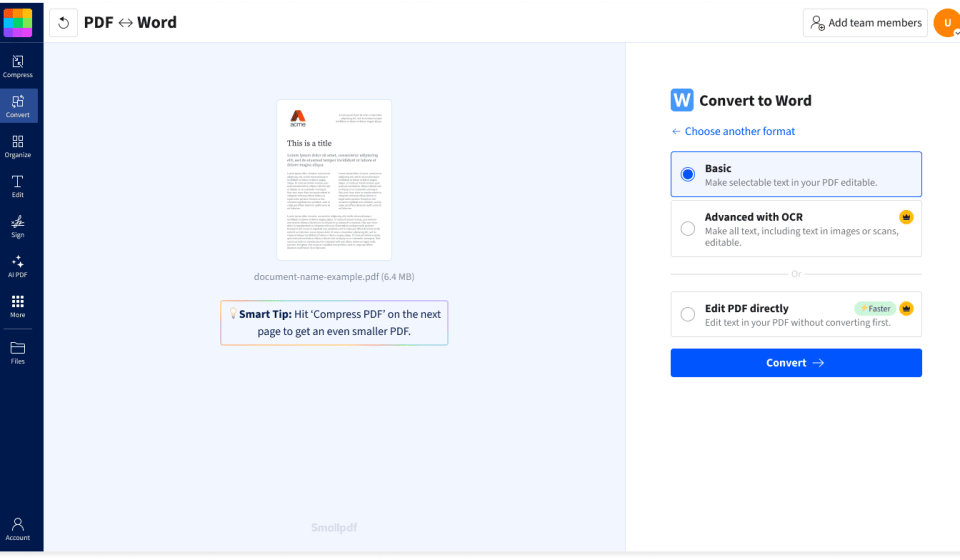
Smallpdf’s PDF to Word tool runs in a browser. Its instructions are simple: upload a PDF, choose OCR when the document is a scan, convert it, and download the DOCX. Smallpdf says basic conversion can be tried without creating an account; OCR for scanned pages is listed as a Pro feature. Plan availability can change, so check the current tool page before starting.

  1. Open the PDF to Word converter and select your file.
  2. If the PDF is a scan, enable OCR if your plan supports it.
  3. Convert the file and download the DOCX.
  4. Open the DOCX in Word or another compatible editor and inspect the layout.

Scanned PDF or text PDF?

Try selecting a sentence in the PDF. If you can highlight individual words, the file likely has a text layer. If the page behaves like one flat picture, it is probably scanned; OCR (optical character recognition) is needed to turn the image of text into editable characters. OCR can make errors, so check names, dates, amounts, and table entries.

What to check after conversion

  • Tables: compare each row and column with the original.
  • Page breaks: check headings and paragraphs that moved between pages.
  • Fonts and symbols: look for substituted fonts, missing characters, or odd spacing.
  • Scanned text: verify OCR results against the page image.
  • Privacy: check the provider’s current file-processing and deletion policy before uploading confidential documents.

Smallpdf or another workflow?

Smallpdf is convenient when you want a quick browser conversion and a DOCX you can continue editing. For one-line corrections, a PDF editor may be simpler. For highly formatted documents, compare the converted result with the source before sending it onward; no converter can guarantee a perfect match on every file.

Frequently asked questions

Can I convert PDF to Word for free?

Smallpdf currently offers a free PDF-to-Word workflow, while some features such as OCR may require a paid plan. Check the tool’s current limits and plan details.

Why does my converted Word file look different?

PDFs preserve page appearance, while Word reconstructs editable text and layout. Complex formatting, scanned pages, and unusual fonts can affect the result.

Try it: Smallpdf PDF to Word · Smallpdf conversion guide

TOOLS ACCESS COMMUNITY

Unlock the Telegram group to access all tools on this site

A one-time payment of US$5 gives you access to the Telegram group and all tools on this site. No subscription.

Enable JavaScript to securely check payment and reveal the invite link.


Share this article

FFacebookXXWWhatsAppLLinkedInPPinterestTTelegram

Author

66tools

Follow Me
Other Articles
PDFgear online PDF editor interface
Previous

PDFgear Review: A Free PDF Editor for Everyday PDF Tasks

Adobe Acrobat scanned PDF enhancement and OCR settings
Next

How to Make a Scanned PDF Searchable with OCR in Adobe Acrobat

One Comment
  1. PDFelement Review: An All-in-One PDF Editor with OCR and AI – 66 Toolbox says:
    October 16, 2026 at 11:40 pm

    […] while UPDF is the closest comparison on price and cross-platform coverage. If you mainly convert, Smallpdf covers the browser workflow; if the problem is bad scans, compare ABBYY FineReader for heavy OCR […]

    Reply

Leave a Reply Cancel reply

Your email address will not be published. Required fields are marked *

Categories

  • AI Tools (66)
  • Audio Editors & DAWs (7)
  • Audio Tools (37)
  • Document Tools (39)
  • eSignature Tools (4)
  • Image Apps (65)
  • Online Document Editors (5)
  • PDF Converters (2)
  • PDF Editors (5)
  • PDF Readers (1)
  • PDF Utilities (3)
  • Podcast & Voice Tools (6)
  • Scanning & OCR (4)
  • Site Updates (1)
  • Uncategorized (1)
  • Video Apps (60)

Recent Posts

  • Grammarly Review 2026: AI Writing Assistant for Grammar, Clarity and Tone
  • FL Studio Review 2026: Popular Beat-Making DAW for Windows and macOS
  • Hemingway Editor Review 2026: Distraction-Free Writing Tool for Clear, Bold Prose
  • Camtasia Review 2026: Professional Screen Recorder and Video Editor for Tutorials
  • Polarr Review 2026: Online Photo Editor and AI-Powered Filters for Quick Retouching

Recent Comments

  1. Léirmheas Nano Banana Pro: Eagarthóir Íomhánna 4K AI Google – 66 Toolbox on Midjourney: Create Images and Explore Visual Ideas with AI
  2. Léirmheas Kling AI: Fís Físeáin le Fuaim Dúchasach agus Rialú Il-sheite – 66 Toolbox on CapCut Review: Quick Video Editing and Captions for Social Media
  3. Léirmheas Otter.ai: Nótaí Cruinnithe AI is Féidir Leat a Chuardach Níos déanaí – 66 Toolbox on Fireflies.ai Review: Searchable Notes for Meetings and Interviews
  4. Léirmheas Video Converter Factory: Comhshó Baisc agus Comhbhrú ar Windows – 66 Toolbox on PowerDirector Review: Desktop Video Editing with AI Features
  5. Léirmheas DaVinci Resolve: Eagarthú Grád Hollywood agus Grádú Dath in Aisce – 66 Toolbox on CapCut Review: The Free Video Editor Behind Most Viral Short Form Clips

Archives

  • October 2026

Categories

  • AI Tools
  • Audio Editors & DAWs
  • Audio Tools
  • Document Tools
  • eSignature Tools
  • Image Apps
  • Online Document Editors
  • PDF Converters
  • PDF Editors
  • PDF Readers
  • PDF Utilities
  • Podcast & Voice Tools
  • Scanning & OCR
  • Site Updates
  • Uncategorized
  • Video Apps

Friendly Links

  • YouTube
Copyright 2026 — 66 Toolbox. All rights reserved. Blogsy WordPress Theme