
Pinnacle Studio Review: Powerful Video Editing for Windows Creators
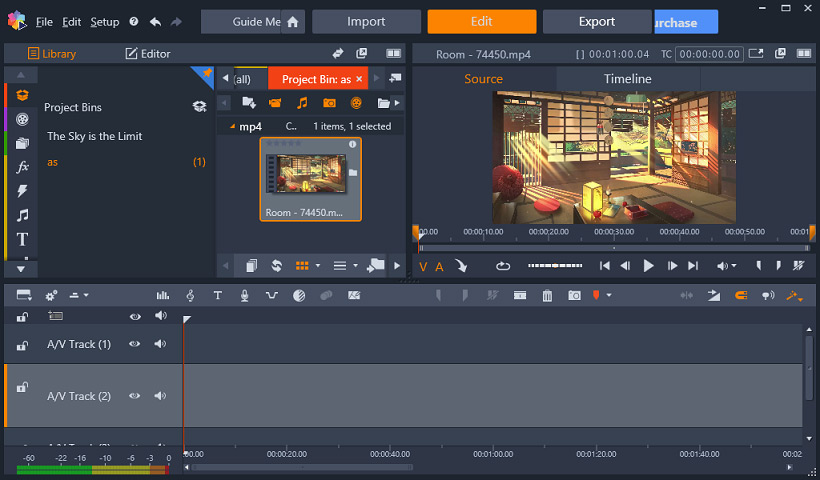
Pinnacle Studio is Corel’s consumer video editor for Windows. It balances an approachable timeline with pro-oriented features like multi-camera editing, color grading, 4K support, and motion tracking, making it a solid choice for YouTube creators and hobby filmmakers.
What is Pinnacle Studio used for?
- Timeline and storyboard editing of video projects.
- Adding titles, graphics, transitions, and effects.
- Multi-camera and stop-motion editing.
- Color grading, 4K/Ultra HD, and 360-degree video editing.
Key Features
- Standard and Ultimate variants with tiered features.
- Unlimited video/audio tracks and 4K support in Ultimate.
- Motion tracking, slow/fast motion, and screen recording.
- Extensive effects, templates, and direct export/publishing.
Pros & Cons
Pros: user-friendly yet powerful, strong effects and templates, good value one-time license, 4K/multi-cam in Ultimate. Cons: Windows only, some advanced tools are Ultimate-only, rendering can slow on weaker PCs.
Pricing
Pinnacle Studio comes in Standard and Ultimate tiers, sold as a one-time license (or lifetime purchase, roughly $49.95 and up), with occasional discounts and a free trial.
Verdict
For Windows users who want more power than free editors but don’t want an ongoing subscription, Pinnacle Studio is a well-rounded choice.
Unlock the Telegram group to access all tools on this site
A one-time payment of US$5 gives you access to the Telegram group and all tools on this site. No subscription.
Enable JavaScript to securely check payment and reveal the invite link.
Share this article