





































Nano Banana Pro is the name most people now use for Google’s premium image model, officially Gemini 3 Pro Image. It built its reputation on two things earlier generators handled badly: text that reads correctly, and edits that keep a subject looking like itself. That makes it more of a design tool than a slot machine for concept art, and it changes how you should prompt it.
This review covers what the model is genuinely good at, a workflow that produces usable output, the real cost per image, and the cases where the cheaper model or a different tool is the better answer.
What Nano Banana Pro is
It is not a separate application. Nano Banana Pro is the model you reach through the Gemini app on a paid Google AI plan, through Google AI Studio and Vertex AI if you are building something, inside Flow for video work, and through third-party API platforms. You give it text, images, or both, and it returns an image, optionally with commentary. The same model handles generation and editing, which is why the conversation can continue across several turns without starting over.
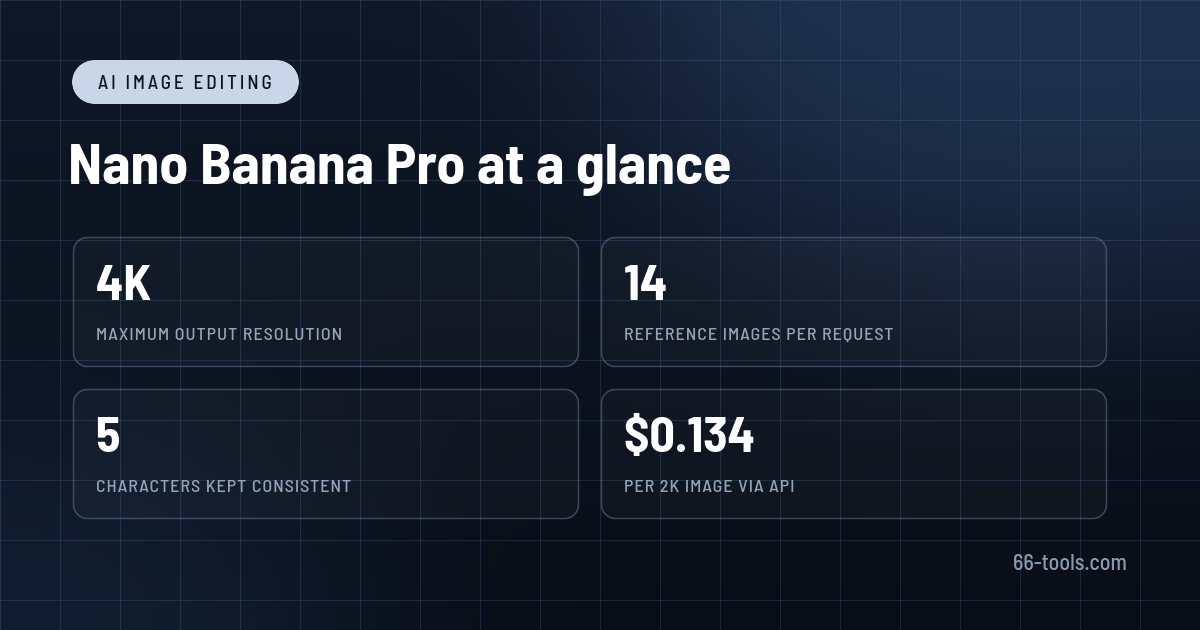
The specification that matters most is reference capacity. The Pro model accepts up to 14 reference images in one request: up to six objects, five characters and three style references. In practice that means you can supply a product from three angles, a model’s face, a brand palette and a layout reference, then ask for a new scene that keeps all of them intact. Lower-tier models accept fewer references and drift sooner, especially with faces.
Google sells several models under the same nickname. Nano Banana 2.1, also called Gemini 3.1 Flash Image, is the fast, cheap default with output from 512px to 4K. Nano Banana Pro costs roughly four times as much at 1K and is reserved for prompts with layers: several people in one frame, exact copy, brand rules, or a layout that has to survive translation into another language.
Where it earns the premium
Type that survives. Posters, menus, packaging comps and infographics need words to be spelled correctly and set in a believable typeface. This is where the model separates itself. Long headlines, small labels and multi-line paragraphs usually come back legible, and asking for a translation keeps the layout rather than rebuilding it. Very small type, unusual fonts and dense technical diagrams still break, so proofread anything that will be printed.
Consistency across a set. Because the model holds several references at once, you can generate a catalog of images where the same bag, bottle or jacket appears from different angles and in different scenes. Character consistency works well enough for storyboards and social series, less well for close-up faces at unusual angles.
Edits rather than redraws. Changing the light direction, shifting the camera, swapping a background or replacing one object while leaving the rest untouched is the core workflow. It is not a pixel-perfect retoucher, but it is far quicker than rebuilding a scene for a client who wants the same shot at dusk.
Grounded graphics. With Search grounding enabled, the model can pull current information into an infographic or map instead of inventing it. Treat the result as a draft: the reasoning is good, but a wrong number in a clean-looking chart is still wrong.
Resolution and ratios. Output goes up to 4K, with roughly 5,500 pixels on the long edge at 16:9. That covers large web assets, print mockups and most presentation work. Ratios run from 21:9 to 9:16, so one prompt can produce a banner and a story crop without a redesign.
A workflow that produces usable images
1. Build a reference folder before writing the prompt
Collect the product shots, faces, logos and layouts you actually want followed. Clean, evenly lit references produce better results than stylised ones. If a character matters, include two or three angles rather than a single portrait, and keep the same references for the whole set.
2. Write a brief, not a wish
State the subject, the framing, the lens or camera angle, the light, the materials, the palette, the exact text, and the output ratio. A prompt that reads like an art director’s note beats a pile of adjectives. Put the things that must not change in a separate sentence: keep the label centred, keep the logo unchanged, keep the background seamless.
3. Solve the text in a second pass
Generate the composition first and accept that a word may be wrong. Then ask for a specific correction: change this line to that, keep everything else identical. Correcting one element per turn is more reliable than asking for a wholesale rewrite, and it preserves the parts you already approved.
4. Draft low, approve, then export high
Work at 1K while iterating. Once the composition and copy are right, regenerate or upscale at 2K, and go to 4K only when the image will be printed or cropped heavily. Generating everything at maximum resolution is the fastest way to waste budget.
What it costs
On the Gemini API, Nano Banana Pro is priced per image rather than per prompt: about $0.134 for a 1K or 2K image and $0.24 for 4K. Batch requests cost half that, which makes overnight runs for a product catalog far cheaper than interactive generation. There is no free API tier, so every automated image is a line item.
Put simply, 100 images at 2K costs around $13.40, and 1,000 costs around $134 at standard rates. The cheaper Nano Banana 2.1 is about $0.034 per 1K image, roughly a quarter of the price, and for social posts and quick drafts the difference in quality is often invisible.
For individuals, the consumer side is easier to justify. The free Gemini tier includes limited image generation, Google AI Plus is $4.99 a month, and Google AI Pro is $19.99 a month with higher limits. If you generate a handful of images a day and edit them conversationally, the subscription is better value than metered API calls. If you generate in batches, the API with Batch pricing wins.
Limitations to check before relying on it
Small faces in crowds, hands holding objects and very fine mechanical detail remain unreliable. Dense text blocks can lose a line or invent a word, and infographics may present a confident but incorrect figure. Skin can look over-clean, which is fine for advertising and wrong for documentary work.
Every output carries SynthID, Google’s imperceptible watermark, so an image can be identified as AI-generated even after editing. Visible marks can also appear in some consumer surfaces. Commercial usage depends on where you generate: the consumer Gemini terms and the paid API terms are different documents, and client work should be checked against the one that applies to you.
Safety filters and likeness restrictions can block legitimate work involving real people, and the model’s internal knowledge has a cutoff unless grounding is on. Finally, Pro is expensive for what most people actually need. Test the same prompt on Nano Banana 2.1 first; move up only when it fails on text, identity or layout.
How it compares with alternatives
For mood, art direction and stylised imagery, Midjourney remains stronger and cheaper to experiment with. For posters and text-heavy graphics on a budget, Ideogram is the closer competitor. Leonardo AI offers more control over models and presets for game and product art.
If your goal is a repeatable pipeline rather than a single image, ComfyUI lets you wire up models, references and upscalers locally. And if you already have a small image that needs enlarging rather than generating, Upscayl does that job for free.
Frequently asked questions
Is Nano Banana Pro free? Not really. The Gemini app includes limited access on the free tier, and the API has no free tier at all. For regular use, budget for Google AI Plus or Pro, or pay per image through the API.
Can I use the images commercially? It depends on the surface you use. Paid API and Vertex usage is governed by Google’s developer terms, while the consumer Gemini app has its own terms. Check the applicable document before putting an image in a client campaign.
Does it add a visible watermark? Every image gets an invisible SynthID watermark. Depending on the app and plan, a visible mark may also appear. The API returns a clean image file.
What is the difference between Nano Banana Pro and Nano Banana 2.1? Pro is the quality model: more references, better text, stronger layout control, higher price. Nano Banana 2.1 is faster and cheaper, supports 512px output and image search grounding, and is the right default for most social and web work.
Can it edit a photo I took? Yes. Upload the photo as a reference and describe the change. The image is processed on Google’s servers, so avoid confidential material unless your plan and settings allow it.
Verdict
Nano Banana Pro is the first image model that feels aimed at production work rather than demos. The combination of reliable type, multiple references and conversational editing removes most of the rework that made AI images frustrating for designers. It is not cheap, and it is not always necessary: for quick social images, the cheaper model is usually enough.
Use it when a client is paying for the layout, the product has to stay recognisable, or the copy has to be right in the image. In those cases, the higher price per image is easier to justify than an afternoon of fixing generated text by hand.
Official product page: Gemini 3 Pro Image (Nano Banana Pro)
API documentation and pricing: Gemini image generation
Editorial note: Features, availability and pricing can change. Verify current details directly with the provider before committing to a workflow.
Unlock the Telegram group to access all tools on this site
A one-time payment of US$5 gives you access to the Telegram group and all tools on this site. No subscription.
Enable JavaScript to securely check payment and reveal the invite link.
Share this article

-
-
-
-
-
-
-
-
Show Comments[…] haluat yksinkertaisen kehotuslaatikon, Nano Banana Pro tai Midjourney ovat lempeämpiä. ComfyUI on niille, jotka tarvitsevat rakenteen ja […]
[…] eins-smellis farsíma endurgerð, hefur Remini engan nærri almennan keppinaut; Nano Banana Pro og aðrir myndandi ritlar eru sveigjanlegri en þurfa leiðbeiningarhæfileika. Skjáborðs […]
[…] נייד בלחיצה, ל-Remini אין מתחרה קרוב במיינסטרים; Nano Banana Pro ועורכים גנרטיביים אחרים גמישים יותר אבל דורשים […]
[…] pieskāriena mobilai atjaunošanai Remini nav tuvāka galvenā konkurente; Nano Banana Pro un citi ģeneratīvie redaktori ir elastīgāki bet prasa uzvednes prasmi. Darbvirsmas […]
[…] на мобилен, Remini няма по-близък основен съперник; Nano Banana Pro и други генеративни редактори са по-гъвкави, но […]
[…] restauraciju na mobitelu jednim dodirom, Remini nema bližeg glavnog rivala; Nano Banana Pro i drugi generativni uređivači su fleksibilniji ali zahtijevaju vještinu upućivanja. Stolni […]
[…] restauraciju mobilnog jednim dodirom, Remini nema bliskijeg mainstream rivala; Nano Banana Pro i drugi generativni editori su fleksibilniji ali zahtevaju veštinu upita. Desktop upscaleri poput […]
[…] мобилна реставрација, Remini нема побли_mainstream ривал; Nano Banana Pro и другите генеративни уредници се пофлексибилни но […]