• English
  • 中文 (中国)
  • ES Español
  • HI हिन्दी
  • AR العربية
  • BN বাংলা
  • PT Português
  • RU Русский
  • JA 日本語
  • DE Deutsch
  • FR Français
  • ID Bahasa Indonesia
  • TR Türkçe
  • TA தமிழ்
  • FA فارسی
  • IT Italiano
  • UR Urdu
  • MR Marathi
  • TE Telugu
  • VI Vietnamese
  • 한국어
  • ไทย
  • Tagalog
  • Kiswahili
  • ਪੰਜਾਬੀ
  • Basa Jawa
  • ગુજરાતી
  • Polski
  • Nederlands
  • Українська
  • Bahasa Melayu
  • Română
  • Magyar
  • Ελληνικά
  • Čeština
  • Svenska
  • සිංහල
  • ភាសាខ្មែរ
  • አማርኛ
  • Finnish
  • Icelandic
  • Slovak
  • Slovenian
  • Estonian
  • Latvian
  • Lithuanian
  • Bulgarian
  • Croatian
  • Serbian
  • Macedonian
  • Maltese
  • Luxembourgish
  • Irish
  • Danish
  • Norwegian
  • Hebrew
  • Albanian
Skip to content
-
Subscribe to our newsletter & never miss our best posts. Subscribe Now!
66 Toolbox

Curated reviews of the best file, image, video, audio and AI tools. Honest comparisons, pricing guides and recommendations.

66 Toolbox

Curated reviews of the best file, image, video, audio and AI tools. Honest comparisons, pricing guides and recommendations.

  • Home
  • 66 Toolbox – AI・動画・音声・画像・ドキュメントツールのレビュー
  • 66 Toolbox – Avaliações de Ferramentas de IA, Vídeo, Áudio e Documentos
  • 66 Toolbox – Best AI, Video, Audio, Image & Document Tools
  • 66 Toolbox – Bewertungen der besten KI-, Video-, Audio- und Dokument-Tools
  • 66 Toolbox – Reseñas de Herramientas de IA, Video, Audio y Documentos
  • 66 Toolbox – Обзоры лучших инструментов для видео, аудио и ИИ
  • 66 Toolbox – مراجعات أدوات الذكاء الاصطناعي والفيديو والصوت
  • 66 टूलबॉक्स – बेस्ट AI, वीडियो, ऑडियो, इमेज और डॉक्यूमेंट टूल्स
  • 66 টুলবক্স – সেরা AI, ভিডিও, অডিও, ইমেজ ও ডকুমেন্ট টুলস
  • Home
  • 66 Toolbox – AI・動画・音声・画像・ドキュメントツールのレビュー
  • 66 Toolbox – Avaliações de Ferramentas de IA, Vídeo, Áudio e Documentos
  • 66 Toolbox – Best AI, Video, Audio, Image & Document Tools
  • 66 Toolbox – Bewertungen der besten KI-, Video-, Audio- und Dokument-Tools
  • 66 Toolbox – Reseñas de Herramientas de IA, Video, Audio y Documentos
  • 66 Toolbox – Обзоры лучших инструментов для видео, аудио и ИИ
  • 66 Toolbox – مراجعات أدوات الذكاء الاصطناعي والفيديو والصوت
  • 66 टूलबॉक्स – बेस्ट AI, वीडियो, ऑडियो, इमेज और डॉक्यूमेंट टूल्स
  • 66 টুলবক্স – সেরা AI, ভিডিও, অডিও, ইমেজ ও ডকুমেন্ট টুলস
Close

Search

  • https://www.facebook.com/
  • https://twitter.com/
  • https://t.me/
  • https://www.instagram.com/
  • https://youtube.com/
Subscribe
Video Apps

InShot Review: The Simplest Mobile Video Editor for Social Media

By 66tools
October 17, 2026 3 Min Read
3

InShot is the phone-based video editor that asks nothing of you: open the app, pick a clip, trim it, add music, export. It is not a professional tool, and it does not pretend to be. It exists because most people need to make a social video in five minutes and do not want to learn a timeline. That narrow focus makes it one of the most downloaded video editors on mobile.
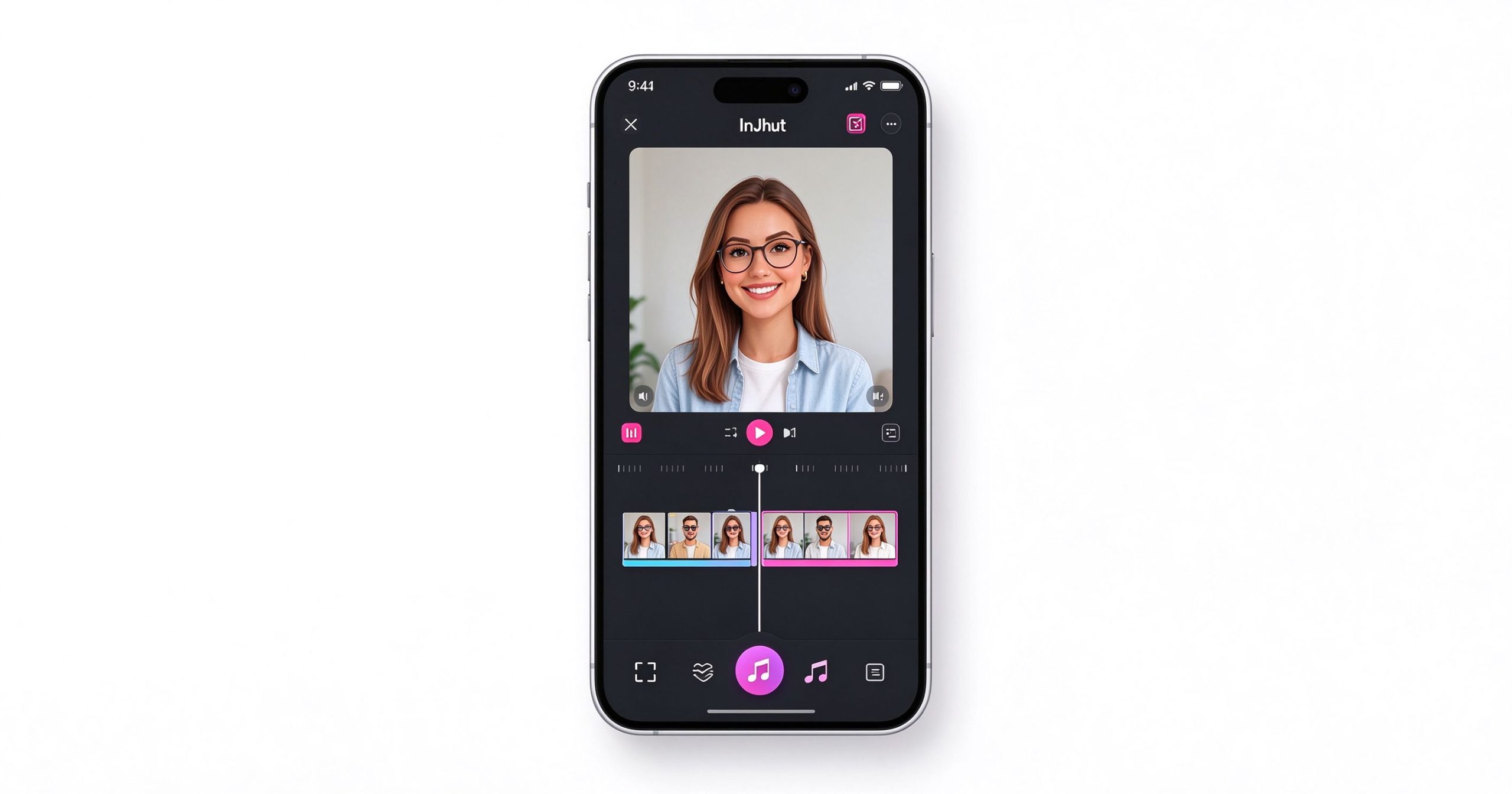
InShot review: simple mobile video editing app for social media
InShot strips mobile video editing down to the essentials: trim, filter, music, text, export.

What InShot is

InShot is a mobile-only video and photo editor available on iOS and Android. The workflow is linear: you import clips, arrange them on a single-track timeline, trim and split them, add transitions, text, stickers, filters and background music, then export directly to Instagram, TikTok or YouTube. There is no multi-track audio, no keyframing, no color grading and no desktop version.

What it does, it does simply. The interface is large-button and gesture-based. You can cut, speed up, reverse, rotate, flip, blur the background, add a voiceover, or overlay another video in a picture-in-picture frame. The music library includes licensed tracks and sound effects. Text overlays and stickers cover the common social media cases.

Where it works

Zero learning curve. If you can trim a video in your phone’s gallery, you can use InShot. Every button is labeled, the timeline is one track, and there are no hidden panels. This is the app you recommend to someone who has never edited video before.

Social-ready exports. InShot defaults to the right aspect ratio for each platform: 9:16 for Stories and Shorts, 1:1 for feed posts, 16:9 for YouTube. You can resize a video and add a blurred background to fill the frame without cropping.

Quick text and stickers. Adding captions, emojis and animated stickers is a few taps. It is not auto-captioning like CapCut, but for short overlay text it is fast.

Where it limits you

The free version adds a watermark to exported videos. Removing it requires the Pro subscription, which is about $3.99 per month or $14.99 per year. The watermark is small but visible, and it makes the free version unsuitable for brand or client work.

There is no multi-track editing, no chroma key, no keyframe animation and no color grading. Projects longer than a few clips become unwieldy on the single timeline. Audio mixing is limited to volume sliders; you cannot duck music under voice.

The asset library (filters, stickers, music) pushes Pro content aggressively. Many of the trending effects are locked behind the subscription, and the free selection feels dated.

What it costs

InShot is free to download, with a watermark on exported videos. InShot Pro removes the watermark, unlocks all filters and music, adds ad-free use and costs roughly $3.99 monthly or $14.99 annually. A one-time lifetime purchase is sometimes available.

How it compares

For more powerful mobile editing with free auto-captions, CapCut is the better free choice. For browser-based editing, Kapwing works on any device. For turning long videos into shorts, OpusClip automates the process. InShot wins when you want the simplest possible phone editor and are willing to pay to remove the watermark.

Frequently asked questions

Is InShot free? The app is free to download, but exports carry a watermark. Pro removes it.

Does InShot have auto-captions? It does not include automatic speech-to-text captioning. You add text manually.

Can I use InShot on a computer? No, InShot is mobile-only. There is no desktop or web version.

Verdict

InShot is the simplest mobile video editor available, and that is both its appeal and its ceiling. It is perfect for quick personal clips and first-time editors, but anyone who needs auto-captions, multi-track editing or watermark-free exports without paying should try CapCut first. Pay for InShot Pro only if you have already tried the alternatives and prefer this interface.

Download: App Store / Google Play

Editorial note: Features and pricing can change. Verify current details directly with the provider.

TOOLS ACCESS COMMUNITY

Unlock the Telegram group to access all tools on this site

A one-time payment of US$5 gives you access to the Telegram group and all tools on this site. No subscription.

Enable JavaScript to securely check payment and reveal the invite link.


Share this article

FFacebookXXWWhatsAppLLinkedInPPinterestTTelegram

Author

66tools

Follow Me
Other Articles
Previous

DaVinci Resolve Review: Hollywood-Grade Editing and Color Grading for Free

Next

WPS Office Review: A Free Microsoft Office Compatible Suite for Any Device

3 Comments
  1. Recenzia Adobe Premiere Pro: Profesionálny video editor pre film a TV – 66 Toolbox says:
    October 22, 2026 at 2:28 am

    […] krátke sociálne videá sú CapCut alebo InShot rýchlejšie. Pre bezplatné profesionálne kolorovanie je DaVinci Resolve rivalom Premiere bez […]

    Reply
  2. Adobe Premiere Pro Apžvalga: The Professional Video Editor for Film and TV – 66 Toolbox says:
    October 22, 2026 at 3:39 am

    […] short social video, CapCut or InShot are faster. For free professional color grading, DaVinci Resolve rivals Premiere at no […]

    Reply
  3. Adobe Premiere Pro Kritik: De professionelle Video-Redakter fir Film an TV – 66 Toolbox says:
    October 22, 2026 at 7:23 am

    […] kuerz Social-Video sinn CapCut oder InShot méi séier. Fir gratis professionell Faarfcategoriséierung rivaliséiert DaVinci Resolve Premiere […]

    Reply

Leave a Reply Cancel reply

Your email address will not be published. Required fields are marked *

Categories

  • AI Tools (66)
  • Audio Editors & DAWs (7)
  • Audio Tools (37)
  • Document Tools (39)
  • eSignature Tools (4)
  • Image Apps (65)
  • Online Document Editors (5)
  • PDF Converters (2)
  • PDF Editors (5)
  • PDF Readers (1)
  • PDF Utilities (3)
  • Podcast & Voice Tools (6)
  • Scanning & OCR (4)
  • Site Updates (1)
  • Uncategorized (1)
  • Video Apps (60)

Recent Posts

  • Grammarly Review 2026: AI Writing Assistant for Grammar, Clarity and Tone
  • FL Studio Review 2026: Popular Beat-Making DAW for Windows and macOS
  • Hemingway Editor Review 2026: Distraction-Free Writing Tool for Clear, Bold Prose
  • Camtasia Review 2026: Professional Screen Recorder and Video Editor for Tutorials
  • Polarr Review 2026: Online Photo Editor and AI-Powered Filters for Quick Retouching

Recent Comments

  1. Léirmheas Nano Banana Pro: Eagarthóir Íomhánna 4K AI Google – 66 Toolbox on Midjourney: Create Images and Explore Visual Ideas with AI
  2. Léirmheas Kling AI: Fís Físeáin le Fuaim Dúchasach agus Rialú Il-sheite – 66 Toolbox on CapCut Review: Quick Video Editing and Captions for Social Media
  3. Léirmheas Otter.ai: Nótaí Cruinnithe AI is Féidir Leat a Chuardach Níos déanaí – 66 Toolbox on Fireflies.ai Review: Searchable Notes for Meetings and Interviews
  4. Léirmheas Video Converter Factory: Comhshó Baisc agus Comhbhrú ar Windows – 66 Toolbox on PowerDirector Review: Desktop Video Editing with AI Features
  5. Léirmheas DaVinci Resolve: Eagarthú Grád Hollywood agus Grádú Dath in Aisce – 66 Toolbox on CapCut Review: The Free Video Editor Behind Most Viral Short Form Clips

Archives

  • October 2026

Categories

  • AI Tools
  • Audio Editors & DAWs
  • Audio Tools
  • Document Tools
  • eSignature Tools
  • Image Apps
  • Online Document Editors
  • PDF Converters
  • PDF Editors
  • PDF Readers
  • PDF Utilities
  • Podcast & Voice Tools
  • Scanning & OCR
  • Site Updates
  • Uncategorized
  • Video Apps

Friendly Links

  • YouTube
Copyright 2026 — 66 Toolbox. All rights reserved. Blogsy WordPress Theme