





































Otter.ai is one of the few AI notetakers that has been around long enough to become a habit. It joins your calls, writes a speaker-labelled transcript, produces a summary with action items, and keeps everything searchable across months of meetings. The pitch is simple: stop taking notes and start asking questions about what was said.
That pitch only holds if the limits fit your meeting load. This review covers what Otter does well, a workflow that keeps the archive useful, the real plan limits, and the cases where a file-based transcription tool or a local model is the better choice.
What Otter.ai is
Otter is an AI meeting agent and transcription service. It can join Zoom, Google Meet and Microsoft Teams calls automatically, record from the desktop app without a bot appearing in the participant list, or transcribe audio and video files you upload. Live transcription appears as people speak, with speaker names, and the recording is stored alongside the text.
Around that core sits a growing workspace: AI Chat that answers questions across meetings, meeting templates that shape the summary for sales calls or standups, action items, integrations with Slack, Notion, Google Drive, Salesforce and HubSpot, and an MCP server that lets tools such as ChatGPT and Claude query your meeting history. Otter now describes itself as a conversational knowledge engine rather than a notetaker, and the product has moved in that direction.
The result is less about the transcript and more about the archive. A single meeting summary is convenient; being able to ask what was promised to a client three months ago is the reason teams keep paying.
Where it performs
Searchable history. Every meeting is indexed by speaker and content, so a question about a decision, a name or a number can be answered without scrubbing audio. AI Chat works across meetings rather than one transcript at a time, which is the feature that changes daily use.
Speaker identification and summaries. Otter labels who said what, tracks talk time and produces summaries with decisions and action items. Templates let you define what a sales call, interview or project sync should capture, so the output is consistent across a team.
Automatic joining. Connect a calendar and Otter joins scheduled Zoom, Meet and Teams calls, writes notes and shares them. For recurring meetings, that removes the manual step that causes notes to be skipped.
Desktop and mobile recording. The desktop app records in-person conversations and calls without sending a bot, which matters when external participants find a visible notetaker intrusive. Mobile apps cover interviews and site visits.
Exports and integrations. Transcripts export as TXT, DOCX, PDF and SRT, and can sync to Notion, Google Docs, Slack or a CRM. The MCP server means an external AI assistant can use meeting history as context, which is useful for drafting follow-ups or proposals.
A workflow that keeps the archive useful
1. Decide which meetings the bot joins
Connect the calendar, then exclude one-to-ones, interviews and anything sensitive. A complete archive is only useful if participants trust it. Tell external guests that a notetaker is present; in many jurisdictions recording requires consent.
2. Choose a template before the call
Pick the template that matches the meeting type. A sales call should capture objections, next steps and budget signals; a standup should capture blockers and owners. The summary is only as good as the structure you give it.
3. Do not edit during the meeting
Live transcription is for following names and numbers, not for producing a clean record. Skim it, note the timestamp of anything important, and fix the transcript afterwards.
4. Review the summary against the recording
Check decisions and action items before sharing. Summaries are good at structure and weaker at nuance, and a missed “we decided not to” can send a project the wrong way.
5. Push the output somewhere it will be seen
Send action items to the project tool and the summary to the channel where the team actually works. A transcript nobody opens is just storage. The Notion connector and AI Chat connectors reduce the copy-paste step.
What it costs
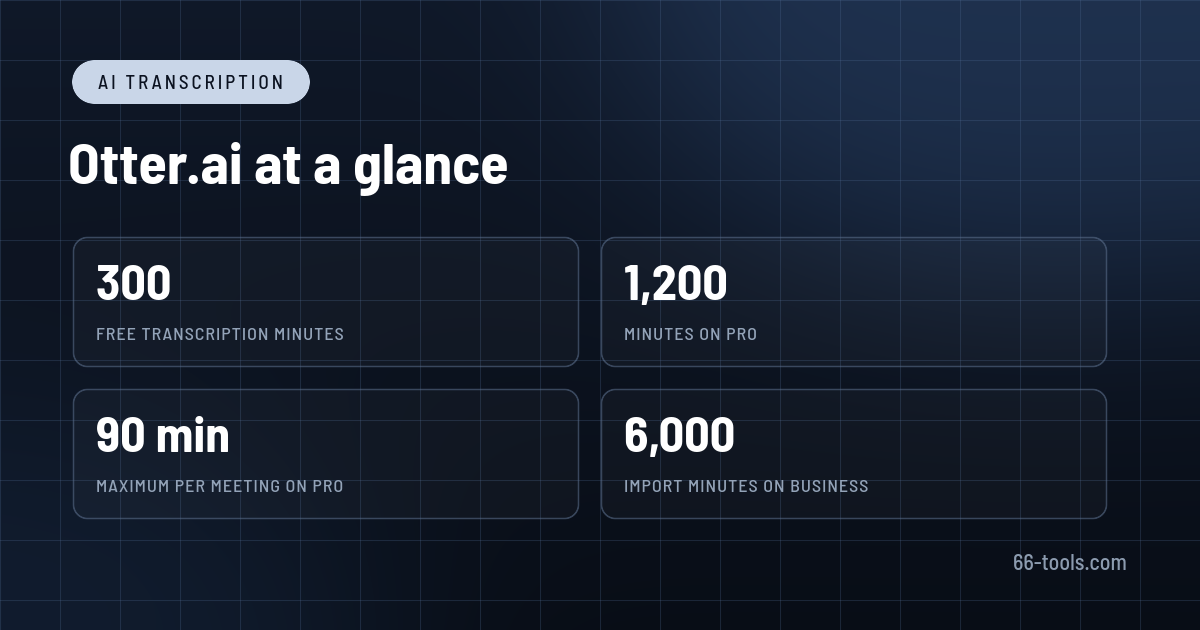
The free Basic plan includes 300 transcription minutes a month, a 30-minute cap per conversation, three file imports for the lifetime of the account, and one concurrent meeting. It includes live transcription, speaker identification, AI Chat, meeting templates and the MCP server, which makes it a genuine trial rather than a demo.
Pro is $16.99 a month, or $8.33 a month billed annually at $99.99 a year. It raises the allowance to 1,200 minutes a month, 90 minutes per conversation and ten file imports a month, and adds advanced templates, unlimited storage, better search and export, and CRM integrations. For an individual with a few calls a day, this is the plan that fits.
Business is $30 a month, or $19.99 a month billed annually, with unlimited in-app recording, 6,000 imported-file minutes per user, four hours per conversation, three concurrent meetings and admin controls. Enterprise adds SSO, SCIM, audit logs, API and webhooks, and HIPAA as an add-on. Student and teacher pricing takes 20% off Pro.
Two footnotes matter. Minutes are shared across meeting, recording and import types and do not roll over, so a quiet month does not buy a busy one. Imported files are capped separately from live meetings, which catches people who mainly transcribe recordings rather than attend calls.
Limitations to check
Accuracy depends on audio quality, accents and jargon. Custom vocabulary helps with names and acronyms, but a noisy room or a fast technical discussion will produce errors. Language coverage varies by plan and English remains the most reliable.
Otter is cloud-only. Recordings and transcripts sit on Otter’s servers, which is a compliance question for legal, medical or financial conversations. Enterprise controls and a HIPAA add-on exist, but the free and Pro plans are not built for regulated data.
The free tier’s 30-minute conversation cap is easy to hit, and the three lifetime imports are a trial, not a workflow. Teams also need to agree on bot etiquette: some clients are uncomfortable with an automated participant, and the desktop recorder is not always practical for external calls.
How it compares
Fireflies.ai is the closest direct competitor, with similar bot-based capture and search. TurboScribe is cheaper for bulk file transcription if you do not need a meeting bot. OpenAI Whisper runs locally and keeps audio on your machine, at the cost of setup and no live meeting integration.
If the goal is editing a recording rather than archiving a meeting, Descript lets you edit audio and video by editing the transcript. For research rather than meetings, NotebookLM works from documents and sources instead of a calendar.
Frequently asked questions
Is Otter.ai free? Yes, with 300 minutes a month, a 30-minute cap per conversation and three lifetime file imports. Regular meeting use needs Pro or Business.
Does Otter join meetings as a bot? It can, for Zoom, Google Meet and Teams. The desktop app can also record without a visible bot in the call.
What languages does Otter support? Multiple languages, with coverage depending on the plan. English is the most accurate; check the current list before relying on it for other languages.
Can I use Otter for client or medical calls? Only with the right plan and consent. Otter stores data in the cloud; Enterprise adds controls and a HIPAA add-on, while free and Pro are not intended for regulated material.
Do unused minutes roll over? No. The monthly allowance resets and does not accumulate.
Verdict
Otter.ai is a strong choice if meetings are a large part of your week and you want the notes to become a searchable record rather than a document nobody reads. The transcription is good, the summaries are usable, and the search across months is the feature that justifies the subscription.
The limits decide the plan. A light meeting schedule fits the free tier, an individual with daily calls should be on Pro, and a team that records everything needs Business for the import allowance and concurrency. If you mostly transcribe files, or cannot send audio to the cloud, a file-based tool or a local Whisper setup will cost less and ask fewer questions.
Official site: Otter.ai
Pricing: Otter.ai plans
Editorial note: Features, availability and pricing can change. Verify current details directly with the provider before committing to a workflow.
Atrakinkite Telegram grupę, kad pasiektumėte visus šios svetainės įrankius
Vienkartinis US$5 mokestis suteikia prieigą prie Telegram grupės ir visų šios svetainės įrankių. Be prenumeratos.
Įjunkite JavaScript, kad saugiai patikrintumėte mokėjimą ir pamatytumėte pakvietimo nuorodą.
Share this article
